Student's Resources
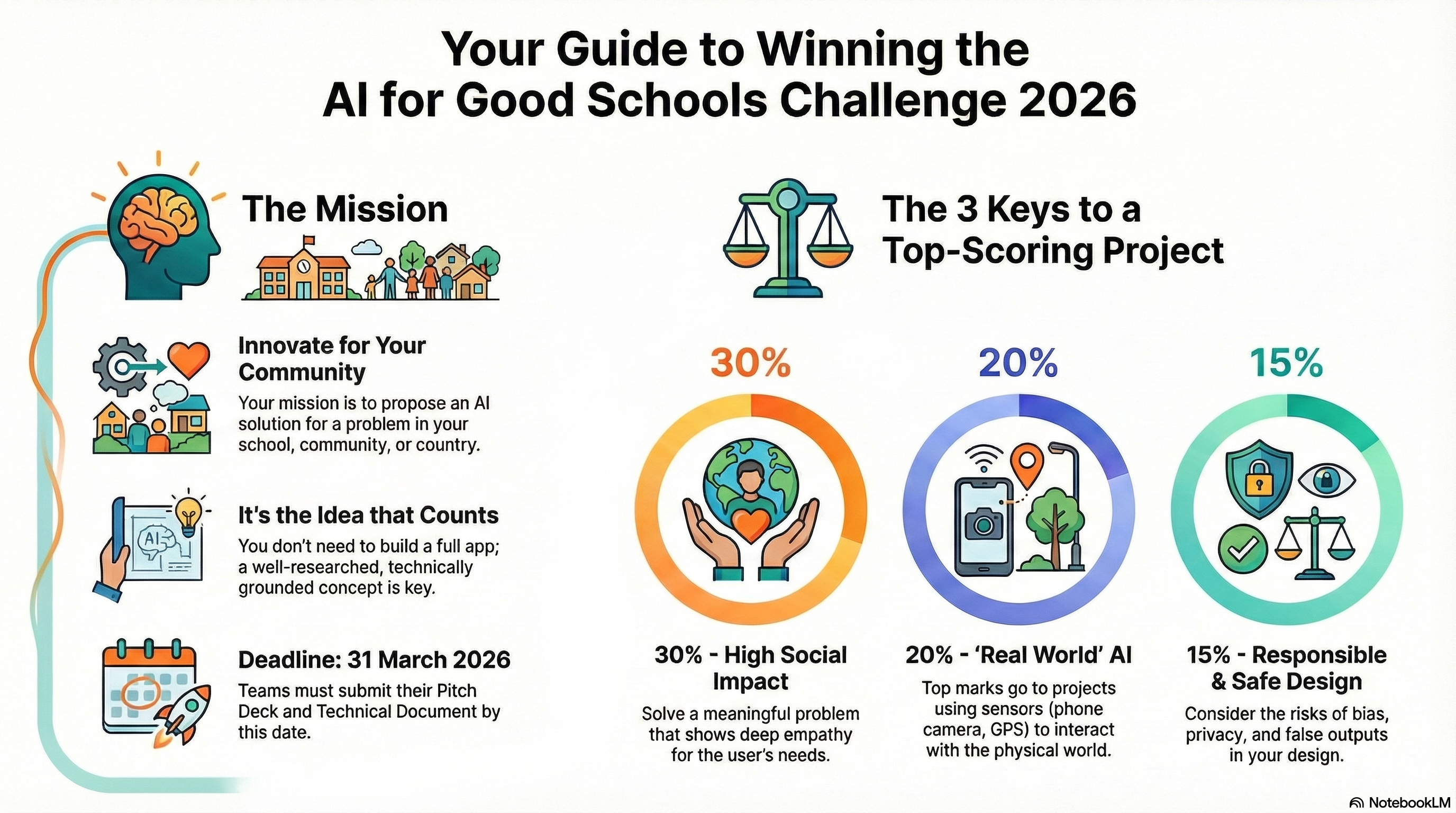
Moving towards Cyber-Physical Systems (IoT, Robotics, Sensors) creates much more engaging projects and solves actual school or council problems (like teacher efficiency, traffic, waste, energy). The current AI technology is making difficult systems a lot easier to interact with but critically we are interested in systems that affect the quality of people's lives through smart implementations of these technologies.
Rough Timeline
A simple "Getting Started" guide for the teams.
- Phase 1: Empathize (Weeks 1-2)
- Interview teachers, parents, or neighbors. Find a problem that annoys them.
- Phase 2: Learn (Week 3)
- Use the "Resources" section to understand what AI can actually do (Prediction, Generation, Classification).
- Phase 3: Ideate (Week 4)
- Brainstorm 10 ideas. Pick the best one.
- Phase 4: Prototype (Weeks 5-8)
- Sketch your app screens on paper or use an appropriate tool.
- Draft your slide deck.
- Phase 5: Refine (Week 9)
- Check against the rubric, specifically the "Ethics" section.
Responsible AI: The 4-Stage Safety Check
When we talk about "Ethical AI," it can feel vague. To make it real, we look at the AI lifecycle in four distinct stages. A responsible technologist checks all four.
1. Training Data (The Ingredients)
Where did the AI learn from?
- The Concept: AI models are trained on billions of text snippets, images, and codes, often scraped from the internet.
- The Responsibility:
- Copyright: Did the AI learn from artists and writers without their permission?
- Bias: If the data contains hateful comments or stereotypes from the internet, the AI will learn them.
- Legality: Is the data public? (e.g., using medical records without permission is illegal).
- Student Check: If you train your own model, where did you get the photos? If you use ChatGPT, do you know what it was trained on? (Hint: It’s often a secret).
2. Model Weights (The Recipe)
The "Brain" of the AI.
- The Concept: After training, the AI turns that data into a massive file of numbers called "Weights." These numbers represent the patterns it learned.
- The Responsibility:
- Intellectual Property (IP): Who owns these weights? Usually, the big company (like OpenAI or Google) owns them. You are just renting them.
- Transparency: Open Source models (like Llama) let you see the weights. Closed models (like GPT-4) keep them hidden.
- Student Check: Are you using a model that is "Open" (anyone can inspect it) or "Closed" (we have to trust the company)?
3. Input ( The Prompt)
What you feed the model.
- The Concept: This is the data you give the AI to get an answer (e.g., your prompt, your photo, your essay).
- The Responsibility:
- Privacy: Never put personal names, addresses, or secrets into a public AI. The company might use your input to train the next version of the model!
- Data Ownership: Generally, you own the data you type in. But once you send it, you lose control of where it is stored.
- Student Check: Does your project require users to upload personal photos? If yes, that is a huge privacy risk.
4. Output (The Result)
What the model gives back.
- The Concept: The image, text, or code the AI generates.
- The Responsibility:
- Hallucinations: The output might be totally false. You are responsible for fact-checking it.
- Ownership: Who owns an AI-generated image? In many countries, nobody owns it because a human didn't create it. You often cannot copyright AI art.
- Harm: If the AI outputs instructions on "How to bully someone," you are responsible for filtering that out.
- Student Check: If your app gives bad advice, who is to blame? The AI, or you for building it?
Level Up: How to Build "Real World" AI
Don't just build a chatbot. To get top marks, your AI should sense the physical world.
You don't need expensive equipment. You likely have the most powerful sensor kit in your pocket right now.
1. The Smartphone as a Sensor Kit
Your phone is packed with sensors that AI can use.
- The Camera (Computer Vision):
- Idea: Point it at the sky to predict local weather clouds.
- Idea: Point it at school lunch trays to estimate food waste.
- The Microphone (Audio Analysis):
- Idea: Listen to the street to detect how heavy traffic is based on noise levels.
- Idea: Listen to a dripping tap to calculate water waste.
- The GPS & Accelerometer (Movement):
- Idea: Detect potholes by measuring bumps (accelerometer) while driving.
2. The "Internet of Things" (IoT)
If your school has Micro:bits or Raspberry Pis, use them!
- Temperature Sensors: Control classroom fans based on AI heat predictions.
- Motion Sensors: Count how many students use the library to optimize opening hours.
- Soil Moisture Sensors: An AI that waters the school garden only when needed.
3. The "Human Loop" (Real World Output)
If you can't use hardware, make sure your Output changes the real world.
- Pure Compute: The AI says "Trash is 90% full." (Boring).
- Real World: The AI sends a text message to the Caretaker's phone saying "Bin 4 needs emptying now." (Actionable).
4. Impact on "Responsible AI" (The 4 Stages)
- The Risk: If you use a Camera or Microphone to "touch the real world," you are now watching/listening to real people.
- The Rule: You must warn people they are being recorded.
- The Fix: "Our Smart Bin camera only looks down into the bin. It is physically blocked from seeing students' faces."
System Card Template
Student Deliverable: The AI System Card
(Include this template in the Student Pack as a printable PDF or editable Doc)
Team Name:
Project Title:
Scale: [ ] School [ ] Community [ ] Country
1. The "What" (Model Basics)
Describe what your AI actually does in one sentence.
Example: An image recognition model that detects plastic bottles in school bins.
Description:
2. The "How" (Technique Used)
Which type of AI technology does your solution rely on? (Tick all that apply)
- [ ] Computer Vision (Seeing: identifying objects, faces, or problems in photos/video)
- [ ] Natural Language Processing (NLP) (Reading/Writing: translating, summarizing, chatbots)
- [ ] Predictive Machine Learning (Forecasting: predicting numbers, traffic, energy use)
- [ ] Generative AI (Creating: making new text, images, or code)
- [ ] Optimization (Planning: finding the best route or schedule)
3. The Data (Fuel for the AI)
AI needs data to learn. If you were to build this for real, what data would you need?
-
What data do you need? (e.g., "Photos of potholes," "Traffic schedules," "School energy bills")
- Where would you get it? (e.g., "Take photos ourselves," "Council website," "Google Maps API")
4. Risks & Limitations (Ethics Check)
No AI is perfect. Be honest about where yours might struggle.
-
Bias: Who might this AI work badly for? (e.g., "Might not recognize accents," "Might not work at night")
- Privacy: Does your AI need personal info? If yes, how do you keep it safe?
- Human in the Loop: Who makes the final decision? The AI or a human?
5. Tools Used
Did you use any existing AI tools to help you design this project? (e.g., Gemini for Education for brainstorming, Midjourney for logos, make sure you check your school's approved models and providers).
- [ ] No
- [ ] Yes (Please list them below):
Example System Card
Completed Example For Reference
Include this in the pack so they know what a "Good" submission looks like.
Team Name: The Green Guardians
Project Title: "SmartBin Validator"
Challenge Track: The School
- 1. Description: A computer vision system mounted on recycling bins that scans items as they are thrown away and flashes a red light if the item is non-recyclable (contamination).
- 2. Technique: Computer Vision (Object Detection).
- 3. The Data:
- What: thousands of images of crushed cans, plastic bottles, and paper, plus "trash" like banana peels and crisp packets.
- Where: We would use the "TrashNet" public dataset and take our own photos in the cafeteria.
- 4. Risks:
- Bias: The model might struggle to recognize clear plastic bottles if the lighting in the canteen is too dim.
- Privacy: The camera points down into the bin, so it will never capture student faces.
- 5. Tools Used: Used ChatGPT to help write the Python code for the prototype; Used DALL-E 3 to design the "SmartBin" logo.